


Rebuilding the whole cart
The project covered the entire cart. After adding a product, shoppers need to see what they've chosen, which benefits they've reached and how far they are from the next tier. They also need to change quantities, add products and finish their order.
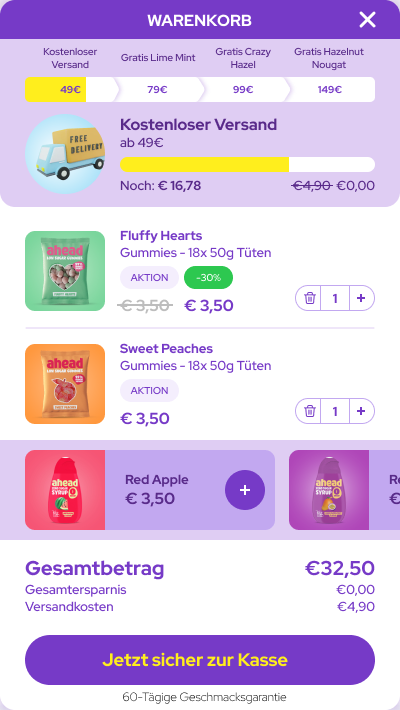
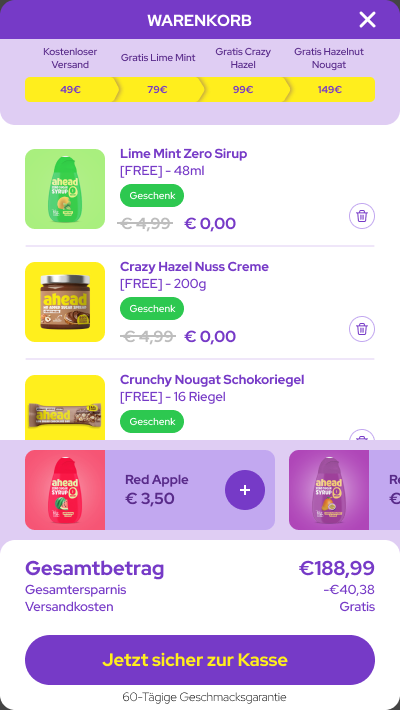
We rebuilt the Ajax cart's presentation and behaviour around those tasks. The project designs show several states, from a basket below the free-shipping threshold to one containing selected gifts.
Make the next benefit visible
Shipping and gift tiers appear at the top. The active tier shows the amount still needed. When a gift becomes available, it appears within the cart so the shopper can select it there.
The reverse journey matters too. Removing an item or reducing its quantity must keep the basket value, progress and available benefits in sync. Those transitions are part of a complete cart rebuild.
Keep products and checkout within reach
Each item groups its image, name, promotional price and quantity control. Recommendations have their own area with a direct add action. The order summary brings together total, savings, shipping and the checkout button.
Shoppers can find the next action where they need it: change an item, add something or continue with the order. The cart brings those decisions into one view.
At least €200,000 in additional annual revenue
The result compares the complete new Ajax cart with the previous version. That's why the case shows how the changes work together: benefits, products and checkout are parts of the same purchase journey.
See Shopify development for the implementation process, Shopify conversion optimisation for choosing priorities, or the cart guide with IDEAL for another example.